
Zoomed eyedropper
A magnifier loupe zooms into the pixels under your cursor, so you pick the exact pixel - not the one next to it.
Keynou Colorpicker is a free color picker and eyedropper extension for Chrome. One click opens a zoomed, pixel-precise eyedropper that grabs the color of anything you can see - any website, image, video, app or your desktop - and auto-copies the HEX code, RGB, HSL or any format you choose.
Works on Chrome, Edge, Brave & every Chromium browser · v1.0
Built for designers and developers who grab colors all day - and anyone who just wants that one perfect HEX code.
A magnifier loupe zooms into the pixels under your cursor, so you pick the exact pixel - not the one next to it.
Sample colors from any tab, any app, PDFs, videos - even your desktop wallpaper. Not limited to the current page.
The instant you click, the color lands on your clipboard in your chosen format - HEX code, RGB, HSL and more.
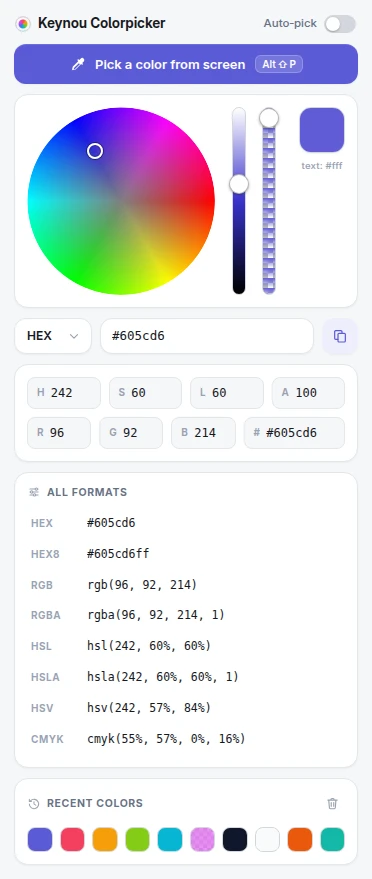
Fine-tune hue and saturation on a wheel, with lightness and alpha sliders plus editable HEX, RGB and HSL fields.
Your last 20 picks are saved as swatches. Click one to reload and re-copy it - perfect for building palettes.
Zero network requests, zero tracking, zero data collection. Everything stays on your device. Works offline.
Opens in milliseconds and starts picking immediately. No bloat, no onboarding, no sign-in - just the color.
The popup follows your system theme automatically, with a polished light and dark interface.
Press Alt+Shift+P to start picking without touching the mouse. Remappable in Chrome settings.
No menus to dig through. The default action is the thing you came for.
Click the Keynou Colorpicker icon in your toolbar - or press Alt+Shift+P. The eyedropper opens instantly over your whole screen.
Move the magnifier over anything visible - a website, an image, another app. The loupe zooms in so you can land on the exact pixel.
The color is copied to your clipboard immediately in your preferred format, like #4F46E5 or
rgb(79, 70, 229), and saved to your history.
See your color in all eight formats at once and copy any of them - or set a default that is auto-copied on every pick.
#10b0b8#10b0b8ccrgb(16, 176, 184)rgba(16, 176, 184, 0.8)hsl(183, 84%, 39%)hsla(183, 84%, 39%, 0.8)hsv(183, 91%, 72%)cmyk(91%, 4%, 0%, 28%)A clean, card-based interface set in Inter that follows your system theme.

If your work touches pixels, palettes or brand guides, this eyedropper earns a permanent spot in your toolbar.
Pull exact colors from mockups, design systems and live products. Check what a competitor really uses, then match it in seconds.
Grab a CSS-ready HEX, RGB or HSL value from any site and paste it straight into your stylesheet - no DevTools digging.
Sample colors from reference images, photos and artwork anywhere on screen, with CMYK values for print work.
Keep campaigns on-brand: verify the exact brand color on any asset, landing page or ad before it ships.
Build palettes from inspiration images with the 20-color history, then fine-tune hue and saturation on the wheel.
Extract real rendered colors for contrast checks, with an instant black-or-white text suggestion for every pick.
Everything people ask before installing - answered honestly.
Yes. Keynou Colorpicker is completely free - no account, no ads, no premium tier. Install it from the Chrome Web Store and start picking colors immediately.
Click the Keynou Colorpicker icon in your Chrome toolbar (or press Alt+Shift+P). The eyedropper opens instantly with a zoomed magnifier - hover over any pixel and click. The color is copied to your clipboard in your chosen format, such as a HEX code.
Yes. The eyedropper samples your entire screen, not just the current tab - other browser windows, native applications, images, videos, PDFs, and even your desktop wallpaper.
HEX, HEX with alpha (HEX8), RGB, RGBA, HSL, HSLA, HSV/HSB and CMYK. Every format is shown at once in the popup, and the format you choose is auto-copied to the clipboard when you pick.
Yes. While picking, a magnifier loupe zooms into the pixels around your cursor so you can select the exact pixel you want - ideal for 1px borders, anti-aliased text and gradients.
No. The extension makes zero network requests and collects no data at all. Your color history and settings are stored locally in your browser and never leave your device.
Yes. The popup includes a full color wheel with hue, saturation, lightness and alpha (opacity) controls, plus editable HEX, RGB and HSL fields, so you can adjust any picked color and copy the result.
Yes. Your last 20 picked colors are saved as swatches in the popup. Click any swatch to reload it and copy it again, or clear the history with one click.
Yes. Keynou Colorpicker works fully offline - picking, converting and history all run locally in your browser.
Yes. Any Chromium-based browser that supports Chrome extensions and the EyeDropper API (version 95+) can run it, including Microsoft Edge, Brave, Opera and Vivaldi.
Yes - Alt+Shift+P opens the picker. You can change the shortcut any time at chrome://extensions/shortcuts.
Keynou Colorpicker is free, privacy-first, and ad-free. A small one-time donation keeps it that way and helps ship new features faster.
Free forever. Installs in five seconds. Your next HEX code is one click away.
Add Keynou Colorpicker to Chrome